








The Identification Film Decides Your Monitor Panel Order: 133-4860 & 198-9749
Key Takeaways
- The film carries the legend. 133-4860 is the industrial version; marine and pumper packages use a different one.
- Read two numbers before ordering: the one on the rear of the panel and the one printed on the film.
- Lamps lighting with an unreadable icon is a film problem, not an electronics problem.
- Old bezels rarely survive removal, which is why a complete kit costs less than a bare panel plus a delay.
- The panel is not plug-and-play. It has to be configured to your engine before it displays correctly.
What the Identification Film Actually Does
The identification film is the printed overlay across the front face of the monitor panel. It carries the icon legend that maps each warning lamp to a condition: oil pressure, coolant temperature, fuel level, system voltage, and the rest of the set.
It looks like a sticker, so it gets ignored at the ordering stage. That is a mistake with a predictable outcome. The lamp positions behind the film are shared across variants, but the legends printed on top of them are not. A panel with the wrong film will light lamp number four for exactly the right reason and tell the operator something entirely different.
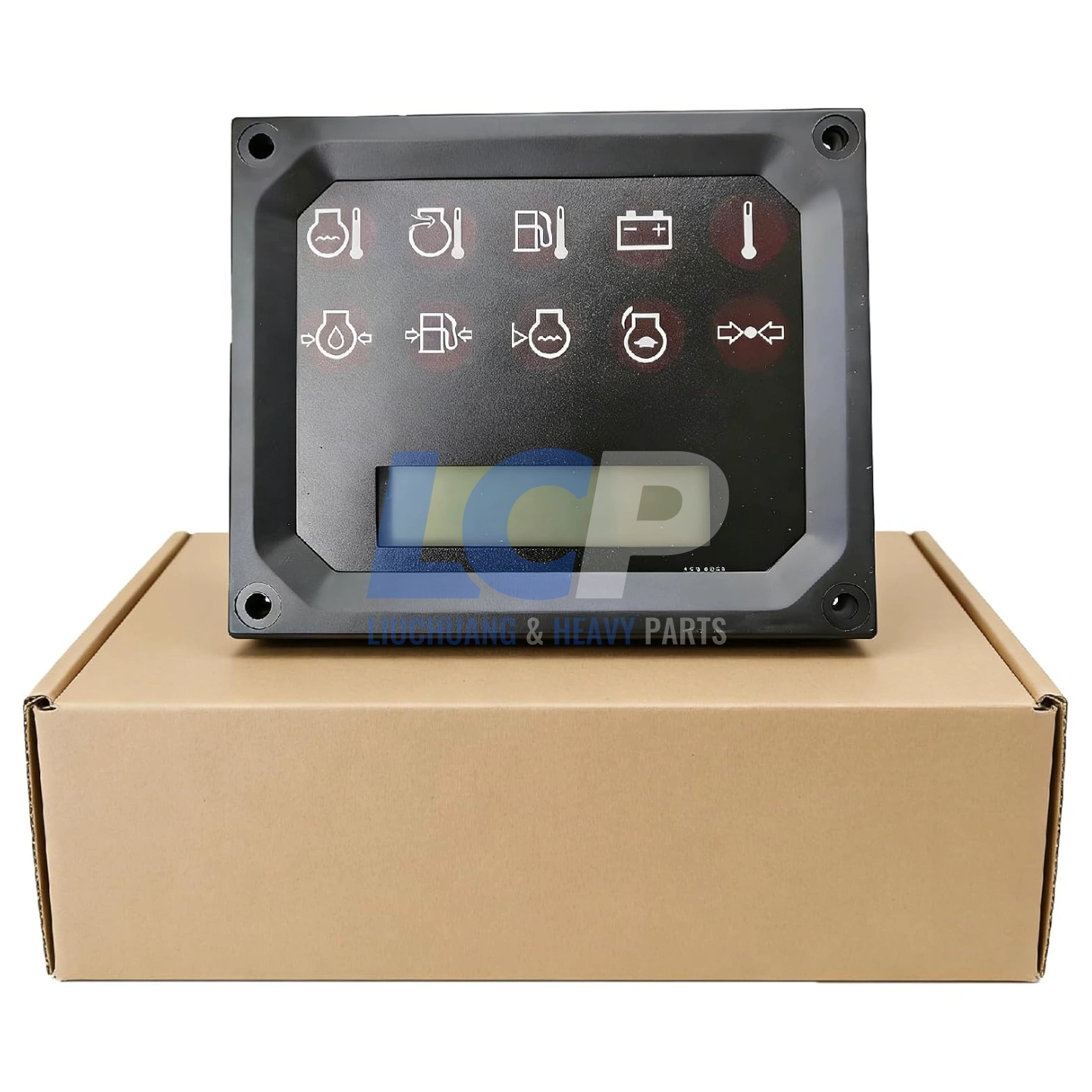
The assembled panel: bezel, industrial identification film and LCD readout with indicator lamps. Click to enlarge.
There is a second reason it matters at ordering time. Films on panels twenty years into service are usually cracked, sun-faded, or lifting at the edges. Plenty of them do not survive removal from the old housing at all. If your plan is to transfer the original film onto a new bare panel, that plan has a failure mode you will discover with the machine already stripped.
Same Panel, Different Legend: Industrial vs Marine and Pumper
The base display module carries the same 198-9749 reference across several application families, but the film on the front is application-specific. This is the single most common reason a correctly ordered panel turns out to be the wrong part.
| Application | Display Module | Film Required |
|---|---|---|
| Industrial engine installations | 198-9749 | 133-4860 industrial legend |
| Marine engine and marine auxiliary | 198-9749 | Marine legend, supplied separately |
| SBF214 and SUF557 pumper packages | 198-9749 | Pumper legend, supplied separately |
If your installation is industrial, the 133-4860 film is the one you need and it comes in the complete kit. If you are running marine or pumper equipment, order the version listed for that application instead. The module will be identical; the legend will not.
Warning: Panels that look identical from the front can carry different legends behind the same housing. Do not order from a photograph of the front face alone.
Is It the Film, the Bezel, or the Panel?
Separate the display problem from the reading problem first. If the lamps light and the LCD shows values, the panel is working, and what has failed is the film, the bezel, or the seal.
| Symptom | What It Usually Points To | What You Need |
|---|---|---|
| Lamp lights but the icon is unreadable | Film faded, cracked or lifted. Electronics are fine. | Film only |
| Icons do not match what the lamps report | A film from a different application was fitted at some point. | Correct-legend film |
| Film peeling at the edges | Adhesive failure from heat cycling. Moisture gets behind it. | Film, before it becomes a seal problem |
| Bezel cracked or screws missing | Broken seal against the cut-out; moisture path to the board. | Bezel and fixing hardware |
| Screen dark but the engine runs | Backlight or supply failure. Check voltage and connector first. | Diagnosis before purchase |
| Some lamps never light | Lamp driver failure, if the fault was actually triggered. | Display module |
| Readout drifts on a continuously running engine | Thermal drift in the input stage; error grows with running hours. | Display module |
| Corrosion around the rear connector | Failed seal admitting moisture. Corroded pins mimic a dead panel. | Clean and inspect first |
The rear connector deserves a proper look before you conclude anything. Pins that appear clean at a glance can be green underneath, and a corroded connector produces symptoms indistinguishable from a failed module.
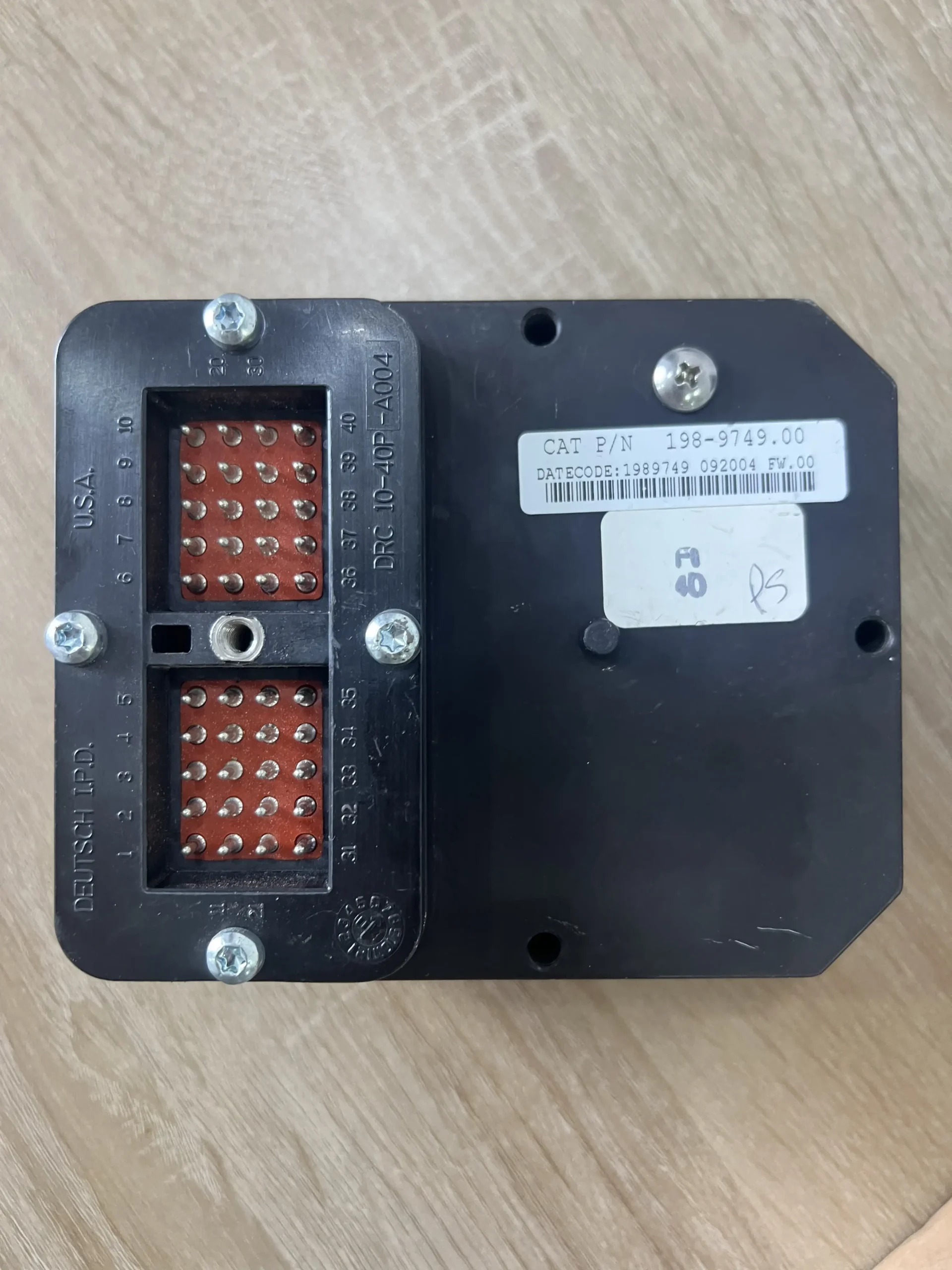
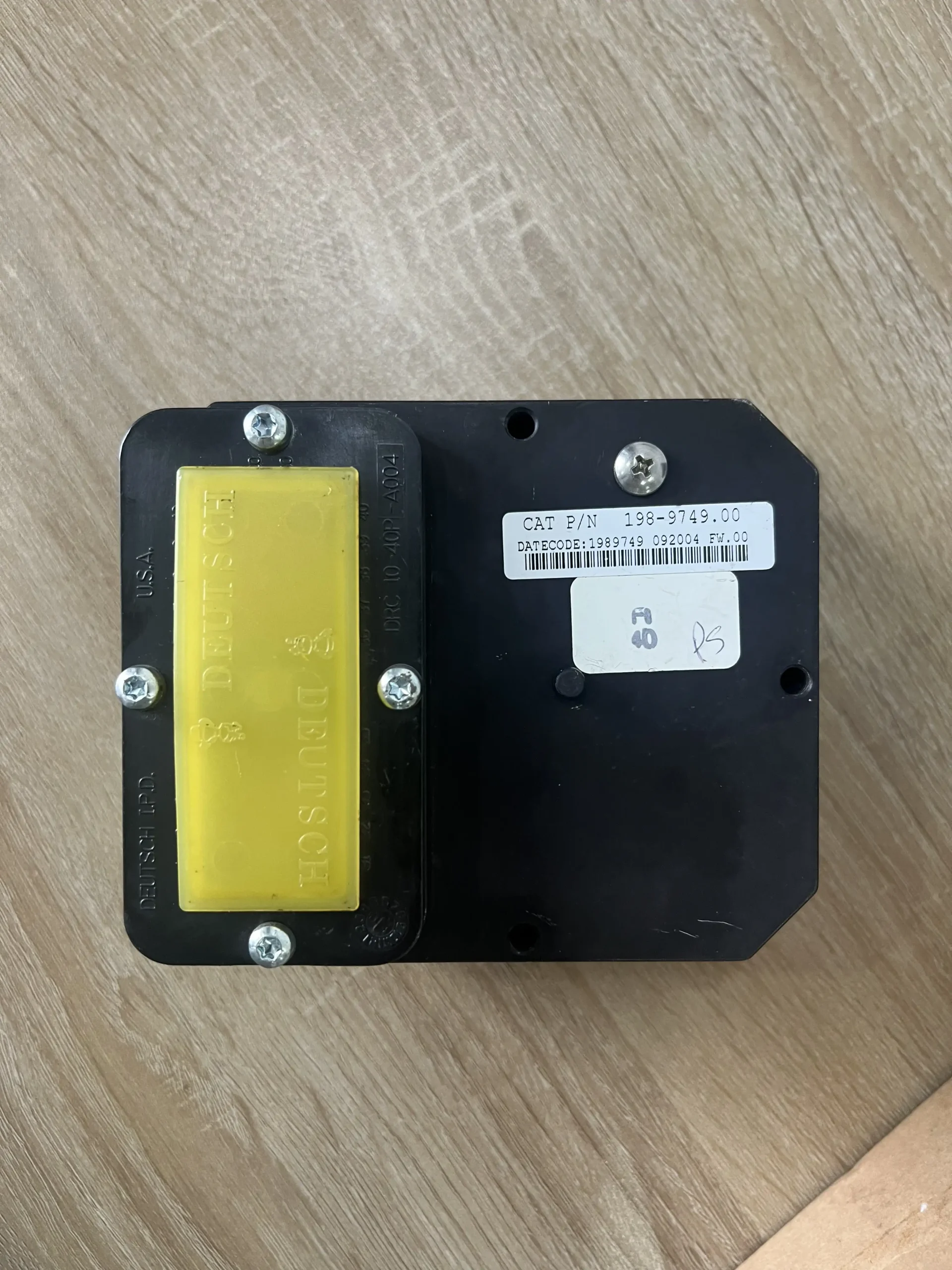
Rear housing and sealed harness connector. Compare pin layout and mounting points against your existing unit. Click any image to enlarge.
Reading Your Existing Panel Before You Order
Two numbers settle the order, and they live in different places. Read both before adding anything to a cart.
- Read the number on the rear of the panel. This identifies the display module itself. Photograph it rather than transcribing.
- Read the number printed on the film, where the old film is still legible. This identifies the legend, and it is the number most buyers never look for.
- Confirm your application family. Industrial, marine, marine auxiliary, or pumper. This determines which film is correct even if both panels share a module number.
- Check the connector and mounting pattern against the listing photographs before purchase, not after delivery.
- Photograph the machine nameplate. It is needed for programming after purchase, so capture it while you are already at the machine.
Pro Tip: If the old film is too degraded to read, the application family is your fallback. An industrial engine installation takes the industrial legend regardless of what the unreadable film once said.
Complete Kit vs Bare Panel: What the Difference Costs
A bare module is cheaper on the invoice and frequently more expensive on the job. The parts a kit adds are the ones most likely to fail during removal of the old unit.
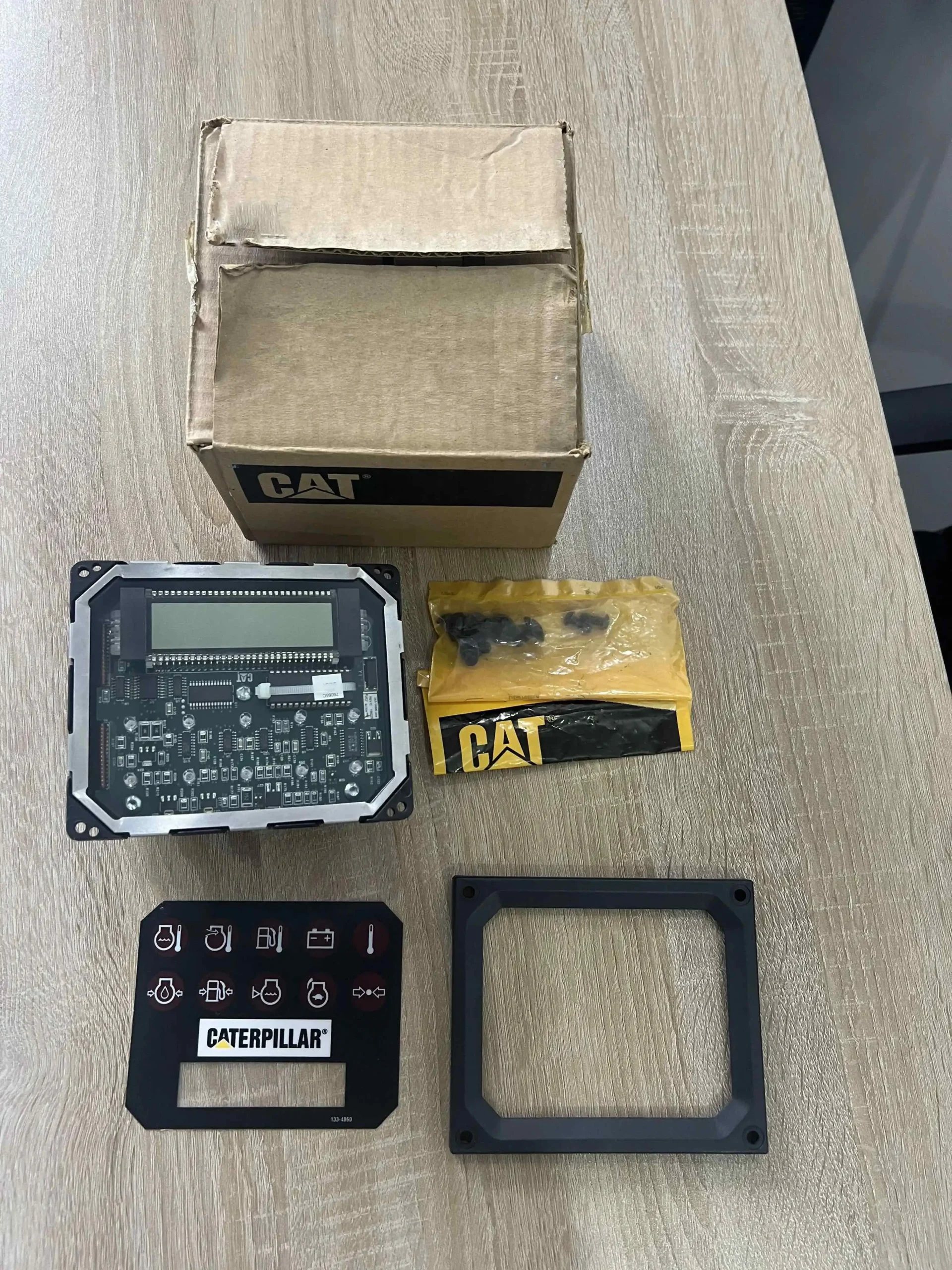
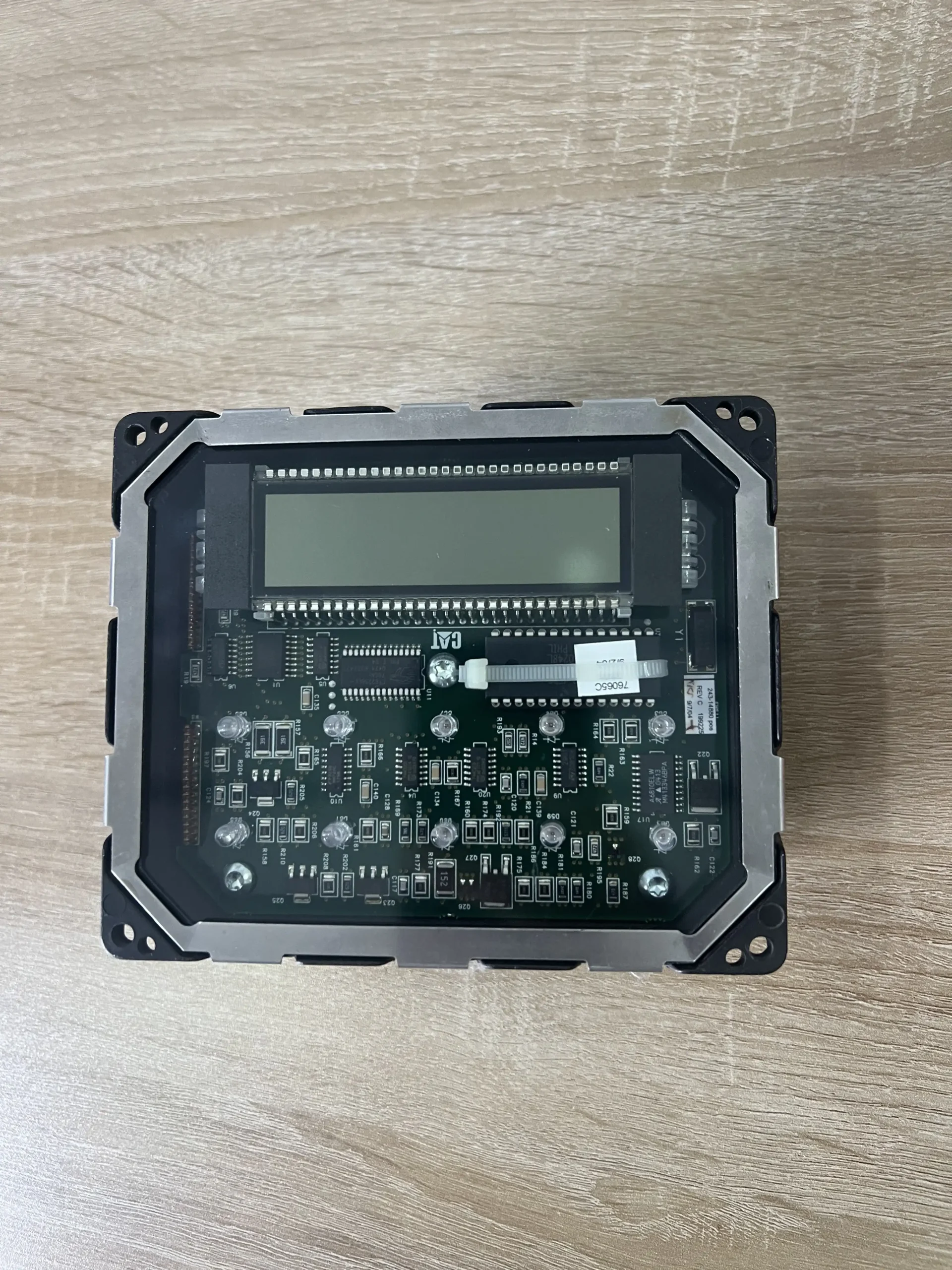
Left: full kit contents. Right: the display module on its own. Click any image to enlarge.
Complete Kit Includes
- Display module with LCD readout and indicator lamps
- 133-4860 industrial identification film
- Mounting bezel / front frame
- Fixing hardware
What Goes Wrong Without Them
- Old film tears or cracks during transfer
- Twenty-year-old bezel breaks on removal
- A missing screw stops the job on a Friday
- Broken bezel seal becomes a moisture path
None of that is dramatic on its own. Together it is the difference between a panel swap finished in an afternoon and one that waits a week for a part worth a few dollars.
Application Coverage
The industrial kit fits for Caterpillar industrial engines across the C series, 3100 series, 3400 series and 3456. Coverage below is a starting point; the numbers on your own panel settle it.
| Engine Family | Models |
|---|---|
| C series industrial | C-9, C-10, C-12, C-15, C-16 |
| 3100 series industrial | 3126B, 3176B, 3176C, 3196 |
| 3400 series industrial | 3406E, 3408E, 3412E |
| 3456 industrial | 3456 |
Interchangeable references: 133-4860 / 1334860 for the film, 198-9749 / 1989749 for the module. You can check current availability on the 133-4860 industrial monitor panel kit product page.
All part numbers and brand names on this page are used for reference and compatibility identification only. Caterpillar and CAT are registered trademarks of Caterpillar Inc. We are an independent aftermarket parts supplier and are not affiliated with, authorised by, or endorsed by any engine or equipment manufacturer.
Programming: Why It Is Not Plug-and-Play
A replacement panel has to be configured to your installation before it displays correctly. Every engine carries its own configuration, and a panel that has not been matched to it will either show nothing useful or show the wrong thing convincingly.
Two items make configuration possible, and both are easier to capture while you are still at the machine:
- The part number of your original monitor, with a clear photograph of it
- A clear photograph of the machine nameplate
Send those after purchase and configuration can be handled before dispatch. Configuration should be carried out by a qualified technician using approved service software, and installation work should begin only after the installation is isolated from all power sources.
Pre-Order Checklist
- Photograph of the panel rear showing the module number and connector
- Photograph of the existing film, including its printed number if legible
- Application family: industrial, marine, marine auxiliary, or pumper
- Engine model and machine nameplate photograph
- System voltage of your installation, 12V or 24V DC
- What you have already checked: supply voltage, ground, connector condition
With those in hand you can send them to our technical team for a fitment check before committing to an order.
Kits are dispatched within one to three business days via DHL, UPS, or FedEx express, with tracking provided. Import duty, VAT, GST, and customs clearance charges are levied by the destination country and remain the buyer’s responsibility.
Frequently Asked Questions
What is the 133-4860 identification film and why does it matter?
It is the printed overlay across the front of the panel that tells the operator what each warning lamp means. Without the correct film the lamps still light, but nobody can tell which fault has been raised. The 133-4860 film carries the industrial engine legend.
Can I use the industrial kit on a marine engine or pumper package?
The base module is the same, but the legend is not. Marine engines, marine auxiliary units, and SBF214 and SUF557 pumper packages use a different icon set. Order the version listed for your application so the legend matches what you are running.
My lamps light but I cannot read the icons. Do I need a new panel?
Probably not. If the lamps light and the LCD shows values, the electronics are working and the film has failed. A replacement film alone resolves it, and one is included in the complete kit.
Can I transfer my old film onto a new bare panel?
Sometimes, but plan for it failing. Films on panels decades into service are usually brittle, and many crack or tear during removal. Discovering that with the machine already stripped is the expensive version of this decision.
Does the panel need programming before it works?
Yes. Every engine carries its own configuration and the panel must be matched to your installation by a qualified technician using approved service software. Send your original monitor part number and a machine nameplate photograph after purchase.
Is my installation 12V or 24V?
System voltage is application dependent, so confirm it against your own installation rather than the engine model. Include it with your enquiry and it will be checked against the panel before dispatch.
Why does a cracked bezel matter if the panel still works?
The bezel seals the panel against the cut-out. Once that seal breaks, moisture reaches the board on an otherwise healthy unit. It is a cosmetic problem right up until it becomes a water ingress problem.
Does a replacement panel change how the engine performs?
No. The monitor panel reports engine parameters and provides the operator interface. It does not govern fuel delivery or engine protection, and a correct replacement restores factory-specified monitoring function only.
Final Word
Most wrong-part returns in this category trace back to the same omission: nobody read the film number. The module number gets checked, the application family gets assumed, and the legend arrives wrong.
Read both numbers, confirm whether your installation is industrial or marine, and order the kit that carries the matching legend. That is the whole decision.
Need the Industrial Monitor Panel Kit With the Correct Film?
Complete kit for industrial applications: display module, 133-4860 industrial identification film, mounting bezel and fixing hardware. Fits for Caterpillar C-9 through C-16, 3126B, 3406E and 3412E industrial engines. Powered up and screen-checked before dispatch, sent within one to three business days via DHL, UPS or FedEx with a 6-month warranty.
Check Availability & Pricing →